- Posts: 2
- Thank you received: 0

Need help with Joomla? We are available for hire to help with Joomla customization, upgrades, maintenance, and custom development.
Explore our services
All questions about EDocman extension
Edocman has an issue when attempting to save a category
- Ali Wari
- Topic Author
- Offline
- New Member
-

Less
More
2 years 9 months ago #163633
by Ali Wari
Edocman has an issue when attempting to save a category was created by Ali Wari
Hi there,
An error occurs when saving a category after editing in the 'Edit Category' section at the back-end. The error message states: 'Save failed with the following error: Data too long for column 'path' at row 1.' Upon checking the category table in the database, I found that the path is excessively long and duplicates the path two or three times. I manually corrected the path, allowing me to save the category successfully. However, upon subsequent edits, the error persists.Additionally, I observed that Edocman has an issue with the global check-in. It does not perform a global check-in automatically, requiring manual intervention each time I edit a category.
Is there a way to address and fix this issue?
Regards,
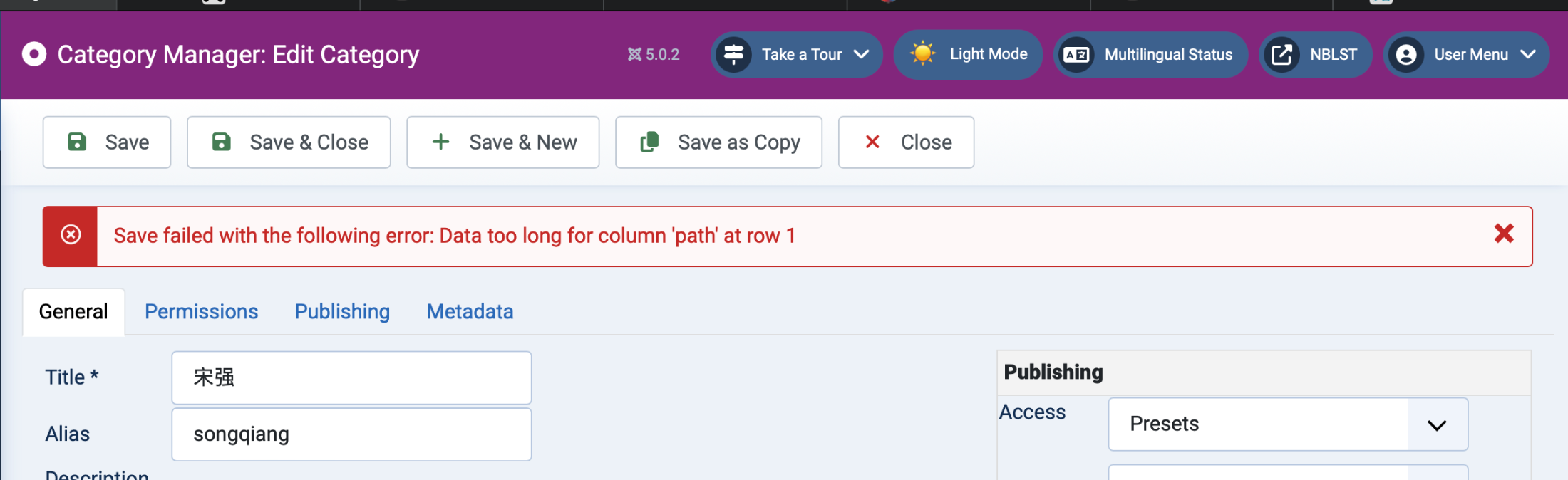
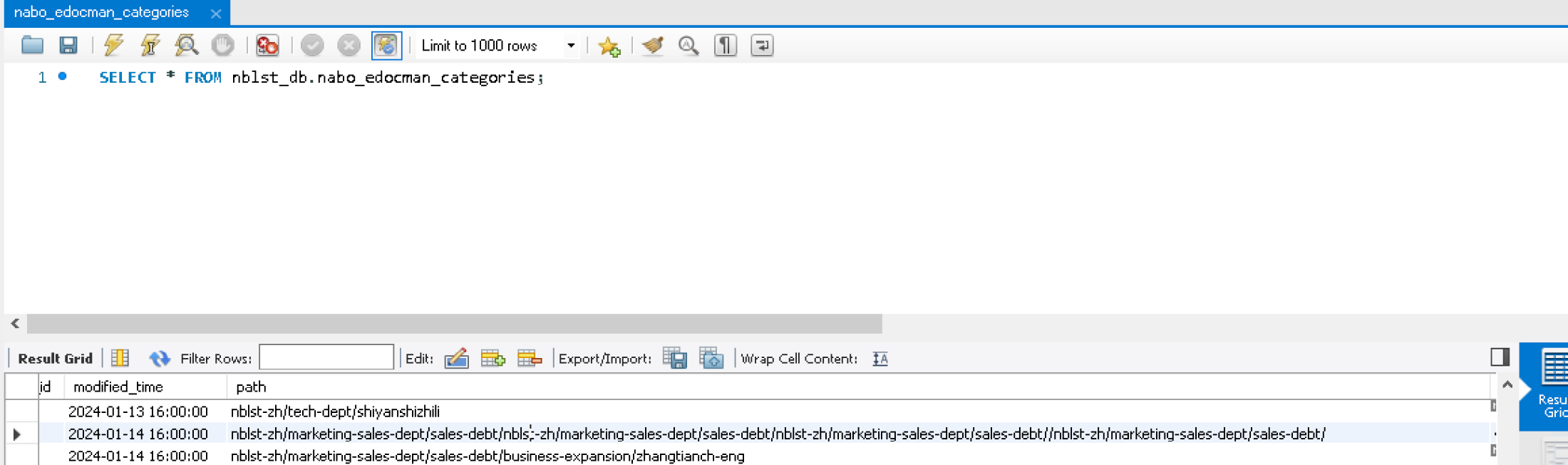
An error occurs when saving a category after editing in the 'Edit Category' section at the back-end. The error message states: 'Save failed with the following error: Data too long for column 'path' at row 1.' Upon checking the category table in the database, I found that the path is excessively long and duplicates the path two or three times. I manually corrected the path, allowing me to save the category successfully. However, upon subsequent edits, the error persists.Additionally, I observed that Edocman has an issue with the global check-in. It does not perform a global check-in automatically, requiring manual intervention each time I edit a category.
Is there a way to address and fix this issue?
Regards,
Please Log in or Create an account to join the conversation.
- Mr. Dam
- Away
- Administrator
-

Less
More
- Posts: 13801
- Thank you received: 1816
2 years 9 months ago #163680
by Mr. Dam
Replied by Mr. Dam on topic Edocman has an issue when attempting to save a category
Hi Ali,
To solve this kind of issue, please using PHPMyAdmin to change attribute of column: "path" in DB Table: #__edocman_categories from varchar to Text.
If you can't do it, you can submit ticket on category: Edocman, and i will help you to make that change.
Thanks
Dam
To solve this kind of issue, please using PHPMyAdmin to change attribute of column: "path" in DB Table: #__edocman_categories from varchar to Text.
If you can't do it, you can submit ticket on category: Edocman, and i will help you to make that change.
Thanks
Dam
Please Log in or Create an account to join the conversation.
- Ali Wari
- Topic Author
- Offline
- New Member
-
Less
More
- Posts: 2
- Thank you received: 0
2 years 8 months ago #163699
by Ali Wari
Replied by Ali Wari on topic Edocman has an issue when attempting to save a category
Hi Dam,
Thank you for your reply. I changed the 'path' in the DB Table: #__edocman_categories from varchar to Text, and the error is not occurring anymore. I will continue testing it in the coming days.
Regarding the global check-in issue, it still doesn't perform a global check-in automatically, requiring manual intervention each time I edit a category.
is there any way to fix this please?

Thank you for your reply. I changed the 'path' in the DB Table: #__edocman_categories from varchar to Text, and the error is not occurring anymore. I will continue testing it in the coming days.
Regarding the global check-in issue, it still doesn't perform a global check-in automatically, requiring manual intervention each time I edit a category.
is there any way to fix this please?
Please Log in or Create an account to join the conversation.
- Mr. Dam
- Away
- Administrator
-
Less
More
- Posts: 13801
- Thank you received: 1816
2 years 8 months ago #163703
by Mr. Dam
Replied by Mr. Dam on topic Edocman has an issue when attempting to save a category
Hi Ali,
Actually, i don't have clear solution to solve this kind of issue. Could you please submit ticket on category: Edocman and provide your site credentials. I will check this matter for you
Thanks
Dam
Actually, i don't have clear solution to solve this kind of issue. Could you please submit ticket on category: Edocman and provide your site credentials. I will check this matter for you
Thanks
Dam
Please Log in or Create an account to join the conversation.
- Lorenzo
- Offline
- Senior Member
-

Less
More
- Posts: 43
- Thank you received: 0
1 week 1 day ago - 1 week 1 day ago #179868
by Lorenzo
Replied by Lorenzo on topic Edocman has an issue when attempting to save a category
Dear Dam,
I open this thread again since I had the same issue and in the past I changed the varchar to text to solve it.
I see that the problem appears again: could you make sure that current and future release of the component will keep that change? Varchar is not suitable for the description textarea
Kind regards
Lorenzo
EDIT
SORRY, the fields Path and Description were still TEXT. Since my customers writes a lot, I am changing it from TEXT to MEDIUMTEXT or LONGTEXT.
Do you think that is a correct approach?
I open this thread again since I had the same issue and in the past I changed the varchar to text to solve it.
I see that the problem appears again: could you make sure that current and future release of the component will keep that change? Varchar is not suitable for the description textarea
Kind regards
Lorenzo
EDIT
SORRY, the fields Path and Description were still TEXT. Since my customers writes a lot, I am changing it from TEXT to MEDIUMTEXT or LONGTEXT.
Do you think that is a correct approach?
Last edit: 1 week 1 day ago by Lorenzo.
Please Log in or Create an account to join the conversation.
- Mr. Dam
- Away
- Administrator
-
Less
More
- Posts: 13801
- Thank you received: 1816
1 week 1 day ago #179869
by Mr. Dam
Replied by Mr. Dam on topic Edocman has an issue when attempting to save a category
Hi Lorenzo,
Please download and install EDocman 4.1 again on your site.
This update will change the path column in the database from VARCHAR to TEXT, which should resolve the issue related to long file paths.
After reinstalling the package, please check the issue again.
Thanks
Dam
Please download and install EDocman 4.1 again on your site.
This update will change the path column in the database from VARCHAR to TEXT, which should resolve the issue related to long file paths.
After reinstalling the package, please check the issue again.
Thanks
Dam
Please Log in or Create an account to join the conversation.
Moderators: Mr. Dam
Support
Documentation
Information
Copyright © 2026 Joomla Extensions by Joomdonation. All Rights Reserved.
joomdonation.com is not affiliated with or endorsed by the Joomla! Project or Open Source Matters.
The Joomla! name and logo is used under a limited license granted by Open Source Matters the trademark holder in the United States and other countries.
The Joomla! name and logo is used under a limited license granted by Open Source Matters the trademark holder in the United States and other countries.